How to Design Your Own Roblox Avatar for Free
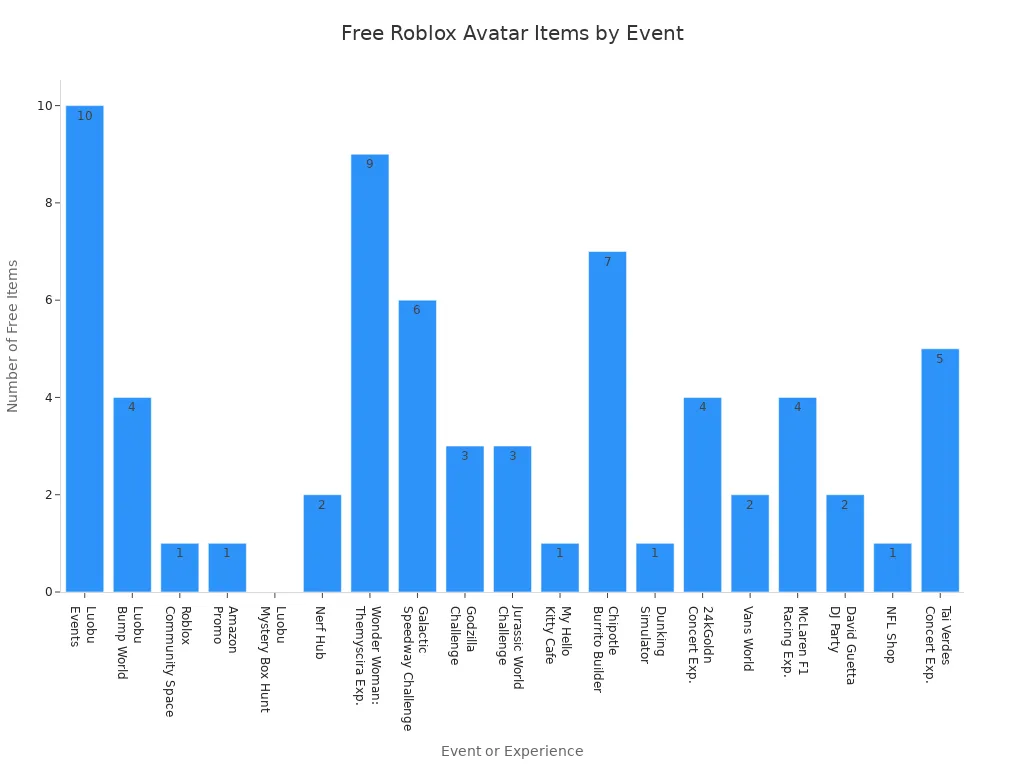
Yes, as a Roblox avatar designer, you can create your own Roblox avatar for free! Roblox allows you to express your unique style without spending any Robux. You can choose from free clothes, hair, hats, and accessories available in the avatar catalog. Many events and games offer special free clothing items. Check out the chart below to see how many free options you have for your next Roblox avatar design.
|
Event/Experience |
Free Clothing Items |
|---|---|
|
Luobu Events |
10 |
|
Luobu Bump World |
4 |
|
Roblox Community Space |
1 |
|
Amazon Promo |
1 |
|
Luobu Mystery Box Hunt |
Multiple |
|
Nerf Hub |
2 |
|
Wonder Woman: The Themyscira Experience |
9 |
|
Galactic Speedway Creator Challenge |
6 |
|
Godzilla Creator Challenge |
3 |
|
Jurassic World Creator Challenge |
3 |
|
My Hello Kitty Cafe |
1 |
|
Chipotle Burrito Builder |
7 |
|
Dunking Simulator |
1 |
|
24kGoldn Concert Experience |
4 |
|
Vans World |
2 |
|
McLaren F1 Racing Experience |
4 |
|
David Guetta DJ Party |
2 |
|
NFL Shop |
1 |
|
Tai Verdes Concert Experience |
5 |
Plus, as a Roblox avatar designer, you can upload your own t-shirt designs for free and try on new clothes without any cost. With all these options, designing your Roblox avatar is both easy and fun!
Key Takeaways
-
You can make your own Roblox avatar for free. Use many free clothes, accessories, and event items from the Roblox catalog.
-
Free tools like Customuse, Creator Hub, and Catalog Avatar Creator help you make and see custom clothes. You do not need to spend Robux.
-
First, make a Roblox account. Then use the avatar editor to mix free items. You can change your avatar’s look easily.
-
You can upload your own t-shirt designs with free templates. This helps your avatar stand out. But there is a small Robux fee to upload.
-
Stay safe by using only official tools. Follow Roblox rules. Protect your account with strong passwords and privacy settings.
Roblox Avatar Basics
What Is a Roblox Avatar?
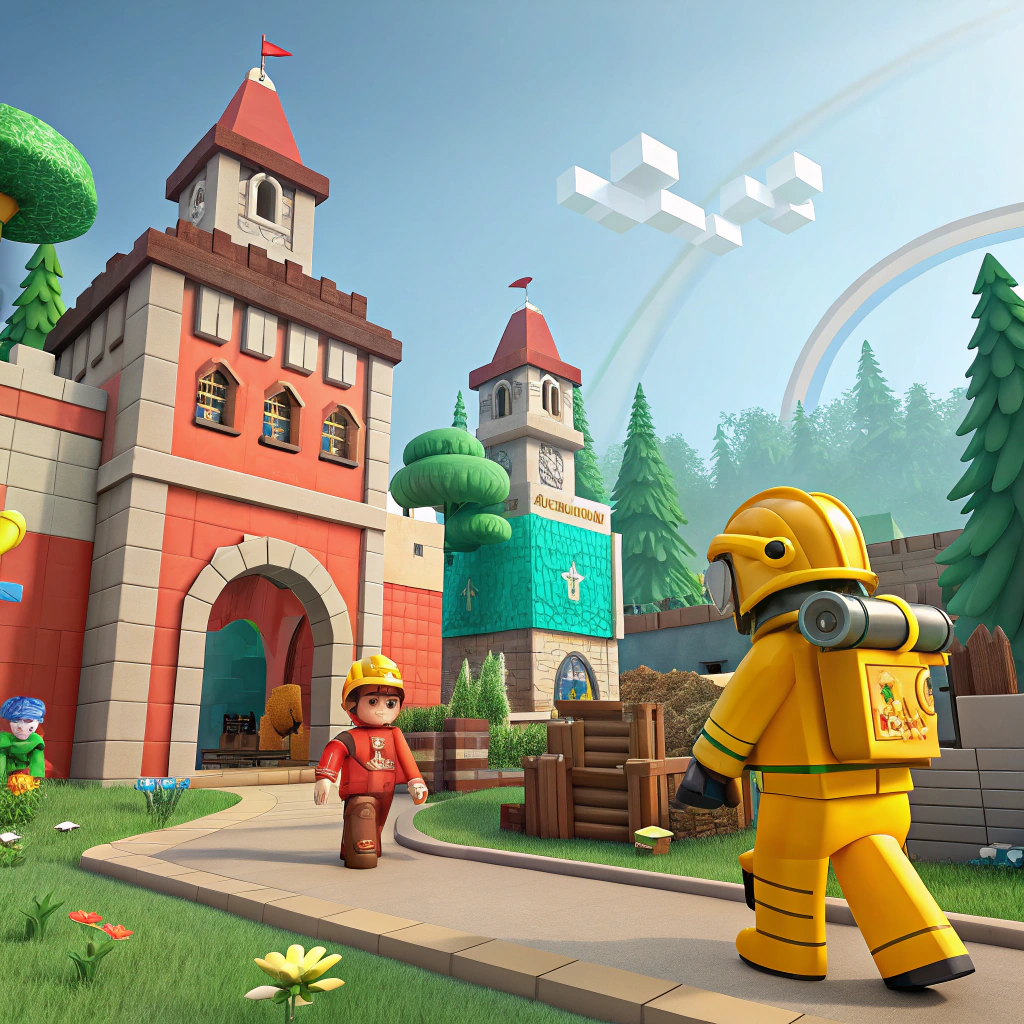
When you join Roblox, you get your own customizable character called an avatar. This avatar is your digital self in the Roblox world. You use it to play games, meet friends, and show off your style.
-
A Roblox avatar is made up of different parts, like a head, arms, legs, and a body.
-
You can add clothing, accessories, and even change facial expressions.
-
The avatar model uses special parts and joints so it can move and wear different items.
-
Every Roblox user has an account-based avatar character that represents them in every game.
-
You can choose between two main types: R6 and R15. R15 gives you more ways to change your avatar appearance and use emotes.
Your avatar is not just a simple character. It comes with features that let you express yourself and interact with others. You can equip hats, shirts, pants, and even a t-shirt to make your look unique. Roblox lets you preview changes instantly, so you always know how your avatar will look before you save it.
Why Customize?
You might wonder why so many players love to change their avatars. Customization is a big part of Roblox. It lets you show your personality, interests, and creativity. When you pick new clothes or accessories, you make your avatar stand out from the crowd.
Many players use customization options to express themselves. You can match your avatar to your real-life style or try something totally new. Some users even get inspired by friends or social media trends. Roblox surveys show that a lot of players enjoy buying new items for their avatars because it makes the game more fun and personal.
Changing your avatar also helps you connect with others. When you see someone with a cool outfit, you might want to talk to them or ask where they got it. Special events and limited-time items make customization even more exciting. You can collect rare gear or show off exclusive looks.
Tip: Try mixing free items from the catalog with your own t-shirt designs. You can create a look that is truly one-of-a-kind!
Roblox makes it easy to update your avatar. You can search for new items, preview them, and swap them out anytime. This simple process keeps players coming back to try new styles and explore more customization options.
Free Roblox Avatar Designer Tools
Designing your Roblox avatar does not have to cost anything. You can use several free tools to create a look that stands out. These tools help you design, preview, and even upload your own clothing or accessories. Let’s look at some of the best options you can try right now.
Customuse
Customuse is a favorite among many Roblox avatar designer fans. You can use it to design custom clothing, hats, and even accessories for your avatar. The platform gives you free templates, so you do not have to start from scratch. You can pick a template, add your own colors, and upload your finished design to Roblox. Customuse also lets you see your design in 3D before you save it. This helps you spot any mistakes and make changes quickly.
If you want to create a t-shirt or a new pair of pants, Customuse makes it easy. You can use their templates to fit Roblox’s texture size rules. This way, your clothing will look great in the game. Many creators use Customuse because it works well with Blender, a free 3D modeling program. You can download avatar templates, sculpt your design, and export it for Roblox Studio. This method is popular if you want more control over your avatar’s look.
Tip: If you get stuck, search for Customuse tutorials on YouTube. Many creators share step-by-step guides that make the process simple.
Creator Hub
Creator Hub is Roblox’s own platform for avatar design and clothing creation. You can access it right from your browser. The Creator Hub lets you upload shirts, pants, and accessories. You can also manage your creations and see how they look on your avatar. The platform supports 3D previews, so you always know what your design will look like in-game.
You can use Creator Hub to test out different clothing combinations. Try mixing free items from the Roblox catalog with your own designs. The platform also helps you follow Roblox’s clothing rules, so your uploads do not get rejected. If you want to become a top Roblox avatar designer, Creator Hub is a must-try tool.
Catalog Avatar Creator
Catalog Avatar Creator is a free online tool that lets you design and preview your Roblox avatar using items from the Roblox catalog. You can search for clothing, accessories, and even hairstyles. The tool supports instant previews, so you can see your changes right away. You can also save your favorite outfits and come back to them later.
This tool is great if you want to try out new looks without spending Robux. You can mix and match free clothing items, hats, and accessories. Catalog Avatar Creator also lets you copy and paste accessory IDs, making it easy to customize your avatar. Many players use this tool to plan their next outfit before updating their avatar in Roblox Studio.
Note: Catalog Avatar Creator is trusted by millions of users. It offers styles like Fantasy, Futuristic, and Casual, so you can always find something that fits your mood.
Popmall
Popmall is a unique tool that lets you design and showcase your own Roblox clothing shop. You can create a shop in minutes and display your designs to millions of players. Popmall supports outfit saving, so players can return and try on your creations anytime. The tool also lets you adjust body proportions, skin tone, and camera angles to show off your clothing.
Popmall updates its catalog often, so you can always find new themed categories. You can search for items by name or ID and navigate through different styles quickly. If you are a developer, Popmall even offers analytics to track your sales and a commission on bundle sales. The setup is fast, and you do not need to write much code.
Tip: Popmall is free to use and helps you reach more players with your designs. Try using it to build your brand as a Roblox avatar designer.
What to Watch Out For
When you use free Roblox avatar designer tools, you need to know about some limits. Roblox does not let you wear more than one classic shirt or pants at the same time. Layered clothing lets you mix items, but there are still some rules. Some advanced settings allow up to 10 accessories, but you have to find the menu and enter Asset IDs yourself.
Also, always use plugins and tools from official sources. Some plugins may have malware or break Roblox’s rules. Using cheats or hacks can get your account banned. Free clothing design tools have texture size limits, so your designs may not look as detailed as you want. Color and transparency can also look different on other devices.
Pro Tip: If you want to learn more, check out YouTube tutorials for each tool. Many creators share tips and tricks to help you design better clothing and avatars.
Quick List: Most Popular Free Roblox Avatar Designer Tools
-
Customuse
-
Creator Hub
-
Catalog Avatar Creator
-
Popmall
These tools give you everything you need to design, preview, and upload your own Roblox avatar and clothing for free. Try them out and see which one fits your style best!
Create a Roblox Avatar Step by Step
Designing your own Roblox avatar is simple and fun. You do not need Robux or any paid items to get started. Just follow these steps and you will have a unique look in no time. This guide focuses on free options, so you can stand out without spending anything.
Sign Up or Log In
Before you can create a Roblox avatar, you need a Roblox account. If you already have one, just log in. If not, signing up is quick and easy. Here’s how you do it:
-
Find the ‘Join’ or ‘Sign Up’ button and click it.
-
Fill in your username, password, email, and birthdate.
-
Check your email for a message from Roblox. Click the link to verify your account.
-
Once you verify, you can start to create your avatar.
-
After logging in, you will see your Roblox dashboard.
Tip: Always use a strong password with letters, numbers, and symbols. Never share your password or personal info with anyone, even if they say they work for Roblox.
When you set up your account, keep your privacy in mind. Avoid sharing your real name, address, or phone number in your profile. You can also adjust your privacy settings to control who can contact you or join your games. Two-factor authentication (2FA) adds another layer of safety. If you are under 13, ask a parent to help you with these steps.
Access the Avatar Editor
Now that you have an account, you can start to design your avatar. Roblox makes this easy with the built-in avatar editor. Here’s how you find it:
-
After logging in, look for the ‘Avatar’ button on the right side of your screen.
-
Click it to open the avatar editor.
-
You will see your current avatar and a menu of options.
-
Open the ‘Outfits’ app to view or create new outfits.
-
Click ‘New’ to start a fresh look, or ‘Edit’ to change an existing one.
The avatar editor lets you change your avatar’s body parts, skin color, and clothing. You can preview changes instantly. Try out different faces, hairstyles, and accessories. The editor works on both R6 and R15 avatar types, so you can pick the style you like best.
Note: Roblox employees will never ask for your password or ask you to upload files outside the official site. Stay safe by using only trusted tools and links.
Choose Free Items
You do not need Robux to look cool. Roblox offers a huge selection of free clothing and accessories in the Roblox catalog. Here’s how you can find and use them:
-
Open the avatar editor and click on the clothing category you want (shirts, pants, hats, etc.).
-
Click the ‘Get More’ or ‘Shop’ button to browse the Roblox catalog.
-
Use the filters to show only free items.
-
Pick the clothing or accessory you like and click ‘Get’ to add it to your inventory.
-
Go back to the avatar editor and put on your new items.
You can mix and match shirts, pants, t-shirts, and accessories. Many events and games give out free clothing, so check back often for new releases. Try using the roblox avatar designer tools mentioned earlier to create custom clothing for avatars. You can even upload your own t-shirt designs for free.
Pro Tip: Save your favorite outfits in the ‘Outfits’ app. This way, you can switch styles anytime without losing your creations.
Stand Out for Free
You do not need to spend Robux to stand out. With a little creativity, you can design a look that is all your own. Here are some ways to make your avatar unique:
-
Combine free clothing from different events and categories.
-
Use the avatar editor to change your skin tone, body shape, and face.
-
Create custom clothing using free templates from roblox avatar designer tools like Customuse or Popmall.
-
Try out layered clothing for more style options.
-
Upload your own t-shirt designs to show off your art skills.
Roblox studio also lets you test your avatar in different games. This helps you see how your clothing looks in action. If you want to create custom clothing, use the free templates and follow the upload steps in Roblox studio. Many players use these tricks to design avatars that get noticed.
🎨 Get Creative: The best part about Roblox is showing your personality. Mix free items, try new colors, and experiment with different styles. You never know what awesome look you will create next!
With these steps, you can create a roblox avatar that is stylish, safe, and totally free. The roblox avatar designer community loves to see new ideas, so do not be afraid to try something bold. Keep checking the roblox catalog for new free clothing and keep designing until you find your perfect look.
Upload T-Shirts to Roblox
How to Upload Shirts to Roblox
You can make your avatar even more unique when you upload t-shirts to roblox. If you want to learn how to upload shirts to roblox, you just need to follow a few simple steps. First, create your design using a roblox shirt template. Make sure your image is a PNG file and matches the size—usually 585×559 pixels for shirts. After you finish your design, save it to your computer.
Here’s how to upload shirts to roblox:
-
Go to the Create page on roblox and find the Shirts section.
-
Click the ‘Upload Shirt’ button.
-
Choose your PNG file and give your t-shirt a cool name.
-
Wait for roblox to process your t-shirt. Sometimes, you might need to wait a few minutes or even a day for moderation.
-
Test roblox t-shirts on your avatar to see how they look.
-
If you want to sell your t-shirt, open the shirt’s settings, turn on ‘Item for Sale,’ and set your price.
Note: You no longer need a Premium membership to upload t-shirts to roblox, but there is a Robux fee for each upload. This fee helps stop spam but can be tough for new creators.
Common problems include shirts not showing up right away or being invisible. Sometimes, roblox moderation needs more time. If your t-shirt disappears, it might have broken a rule. Always check your design and follow the roblox community standards.
Use Free Templates
You don’t need to start from scratch. Free roblox shirt template options are everywhere online. Sites like Pixlr and Swagify.com offer lots of roblox shirt template choices. You can also find roblox t-shirt template files with shading and cool effects. Just download a roblox shirt template, open it in an editor like Pixlr, Canva, or Paint.NET, and add your own colors or graphics.
-
Save your finished t-shirt as a PNG file.
-
Use the roblox shirt template to make sure your design fits all parts of the avatar.
-
Try out different roblox t-shirt template styles for sleeves, torso, and back.
You can test roblox t-shirts in Roblox Studio before uploading. This helps you spot any problems with alignment or colors. If you want inspiration, search for roblox shirt template ideas, but always make your own art. Mixing and matching free shading templates can make your t-shirt stand out.
Tip: Always use original designs and avoid copying others. If you run into issues, contact roblox support for help.
You can make your own special avatar for free by following this guide. Try using different tools and templates to see what you like best. Look for new free items often. These updates let you get cool accessories, join fun events, and keep up with trends.
-
New free items help your avatar look different and sometimes give you extra features.
-
If you stay updated, you will not miss out on rewards or promo codes that are only around for a short time.
-
People in the community like to share tips and free designs, so it is easy to learn and get better.
Keep trying new things, have fun, and show your creativity every time you change your look!
FAQ
Can I design a Roblox avatar without spending Robux?
Yes! You can use free items from the Roblox catalog and upload your own t-shirt designs. Many events also give out free accessories and clothes. You do not need Robux to look awesome.
How do I find free items for my avatar?
Just open the Roblox catalog and set the filter to “Free.” You will see all the free clothes, hats, and accessories. New free items appear often, so check back regularly.
Why won’t my uploaded t-shirt show up right away?
Sometimes, Roblox needs time to review your design. This process can take a few minutes or even a day. If your t-shirt breaks a rule, Roblox may remove it. Always follow the community guidelines.
Can I use my own art for Roblox shirts and t-shirts?
Absolutely! You can create your own designs using free templates. Just make sure your art follows Roblox’s rules. Original art helps your avatar stand out and shows off your creativity.
See Also
Step-By-Step Guide To Creating Custom Roblox Shirts
Best Ten Tricks To Make Popular Roblox Avatars
Transform Your Roblox Avatar Into A Physical Toy
Create Stunning Roblox Profile Pictures Using Online Tools
Guide To Building A Roblox Character Toy Yourself